Renatta Script: A Vintage Typeface for Web Design
I was halfway through a homepage redesign for a boutique floral studio when I hit that familiar wall. The layout was clean, the photography was lush, but the typography felt cold. The hero section needed warmth, something that whispered "hand-tied" and "organic" rather than just displaying information. That is when I pulled Renatta Script into the project. As a web designer who constantly balances aesthetic appeal with user experience, I am always cautious about introducing script fonts into digital interfaces. They can easily become illegible clutter if not handled with care. However, after testing Renatta Script across various breakpoints and device simulations, I found it to be a remarkably balanced tool for adding vintage charm without sacrificing clarity.
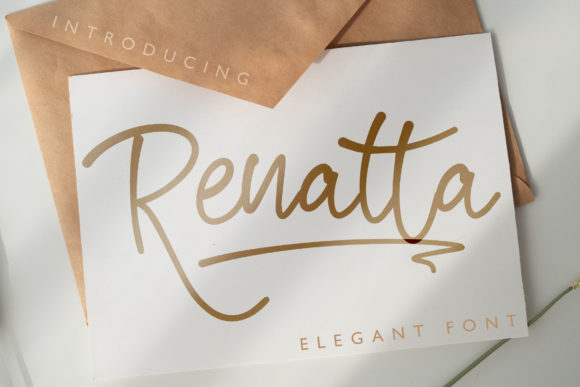
Renatta Script is defined by its smooth curves and well-balanced structure, offering a vintage style that feels authentic rather than forced. It belongs to the Script Amp collection, a category of Fonts that prioritizes both artistic flair and technical reliability. For digital creators, the immediate appeal lies in its PUA encoding. This technical feature allows access to alternate characters and ligatures directly through standard keyboard shortcuts or design software panels, which streamlines the workflow significantly when customizing headlines or creating unique logo marks for client brands.
Creating Visual Hierarchy in Hero Sections
The primary test for any display font in web design is how it performs in the hero section. This is the first thing a visitor sees, and it sets the tone for the entire user journey. I placed Renatta Script over a high-resolution image of dried botanicals, using it for the main headline. The result was instant elevation. The font’s vintage personality added a layer of sophistication that a standard sans serif simply could not achieve. It transformed the page from a generic template into a curated editorial experience.
However, using a script font for web headers requires strict discipline regarding size and spacing. I found that Renatta Script shines when used for short phrases, names, or titles rather than long sentences. In my testing, keeping the headline to three or four words allowed the smooth curves to breathe. When I attempted to use it for a longer subheading, the intricate details began to merge, reducing readability. For web designers, this means Renatta Script is best reserved for impact moments: the main value proposition, a seasonal campaign banner, or a signature sign-off. It is not a workhorse for body copy, but it is an excellent specialist for emotional connection.
Responsiveness and Mobile Readability
A beautiful font on a desktop monitor can become a blurry mess on a mobile screen. This is where many decorative typefaces fail, but Renatta Script held up surprisingly well during responsive testing. The key is managing the scale. On smaller screens, I had to increase the font size slightly more than I would with a blockier display font to ensure the terminals and swashes remained distinct. The smooth curves that define its character need enough pixel density to render clearly.
I also tested the font against different background contrasts. On light backgrounds, the thin strokes remained visible, but on dark or busy image overlays, I had to add a subtle text shadow or a semi-transparent overlay behind the text to maintain legibility. This is a crucial consideration for UI designers. If you are using Renatta Script for a call-to-action button or a navigation element, ensure there is sufficient contrast. For accessibility-heavy interfaces, I would recommend sticking to a clean sans serif for functional elements and using Renatta Script purely for decorative branding moments. This ensures that users with visual impairments are not hindered while still allowing the brand to express its creative identity.
Strategic Font Pairing for Digital Brands
No font exists in a vacuum, especially in web design. The success of Renatta Script depends heavily on what it is paired with. Because it is a vintage-styled script with a strong personality, it demands a neutral partner. I experimented with pairing it with a geometric sans serif font for the body copy and navigation links. This combination created a modern typography balance: the sans serif provided structure and readability, while Renatta Script added the human touch.
Alternatively, for a more editorial design feel, I paired it with a classic serif font. This combination worked beautifully for a coaching website that wanted to convey authority mixed with approachability. The serif added weight and tradition, while the script added warmth. Avoid pairing Renatta Script with another handwritten font or a highly decorative display font. The visual competition creates noise and confuses the user’s eye. In web design, clarity is king, and font pairing should always serve the goal of guiding the user through the content hierarchy smoothly.
Technical Considerations for Web Implementation
Before integrating any premium font into a live website, technical due diligence is essential. Renatta Script is PUA encoded, which is fantastic for static design assets like social media graphics, PDF downloads, or PNG headers. However, for live web text, you must ensure you have the correct webfont formats (such as WOFF or WOFF2) to guarantee fast loading times and cross-browser compatibility. Slow-loading fonts can negatively impact Core Web Vitals, so optimizing file size is critical.
Additionally, check the commercial font licensing terms. If you are building a site for a client who sells digital products or uses the font in their logo, ensure the license covers web embedding and commercial use. Multilingual support is another factor to verify if the brand operates globally. While Renatta Script offers a beautiful range of characters, ensuring it supports the necessary language sets prevents broken text rendering for international visitors.
Ultimately, Renatta Script is a powerful asset for web designers looking to inject personality into digital spaces. It is not a utility font; it is an emotional one. Use it to highlight what matters most, pair it with clean, readable typefaces, and respect its limitations on small screens. When used with intention, it transforms a standard webpage into a memorable brand experience, proving that even in the digital realm, the right curve can make all the difference.